5.Page
5.1Principle
WebSquare Page refers to a methodology that WebSquare adopted to implement the SPA mode as well as a UI development unit. WebSquare Page is a UI component that provide properties, events, and methods. A developer can create UI element that functions as an independent web page containing model, view, and control or as a module.
WebSquare Page is the minimum unit of UI development enabled by WebSquare5.
- Features of WebSquare Page
Saved as an XML file.
Works as a single, independent web page, or to be included in a container-type component (such as WFrame, IFrame, TabControl, WindowContainer, WidgetContainer, or Popup).
May have a separate scope.
Functions as a component.
5.2Scope
With the scope feature, the developer can make an entire web page as a single page. IFrames are often used as a default frame unit. Loading each IFrame, however, means loading the browser which means repeated loading of the browsers and increased memory load. Loading WFrame does not require browser loading. Hence, by using a WFrame instead of an IFrame, the developers can minimize use of IFrame as well as the memory load.
In most cases, use of WFrame is recommended unless there is a special need such as to reload the browser and to empty the memory for the smooth interface with external solutions. Except such cases, use WFrame.
5.3Structure
The following compares XML code generated by WebSquare5 with typical HTML code.
Figure 5-1.WebSquare5 Code vs. HTML Code
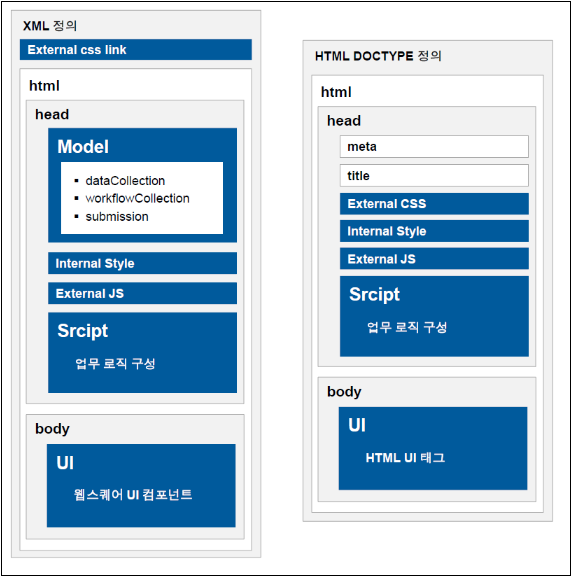
Element | Description | ||
|---|---|---|---|
<head> | <xf:model> | <w2:dataCollection> | Data Structure |
<xf:workflow> | Execution order of submit and submitDone | ||
<xf:submission> | Defines the submit required to call the service. Each submit includes a unique ID. | ||
<script> | Defines the global script. Defines the event functions of the component. | ||
<style> | Defines the style. | ||
<body> | Contains component, property, and UI settings. | ||
5.3.1Model
5.3.1.1DataCollection
Defines the data objects.
DataMap
DataList
LinkedDataList
The DataCollection defines request/response data and the data to be used on the UI.
5.3.1.2Submission
Interface designed to enable server communication
Multiple submissions for various purposes.
Supports synchronous and asynchronous communications.
Functions to be executed before/after the communication.
Set the data to send (request or ref) and the data to receive (response or target).
5.3.1.3Workflow
Designed to run multiple submissions.
Defines the execution order, result handling order, and execution of the submission based on the result.
Recommended for the search (or Select) operations.
5.3.2Script
Defines the work logic.
Defines the global script.
Defines the event functions of the component.
5.3.3Body
UI design drawn on the Design tab
Component layout and configuration
Properties of each component
5.4Running Browsers
All UI design created on the WebSquare5 Studio are generated as XML files, and these XML files are converted into HTML files by the WebSquare5 Engine.
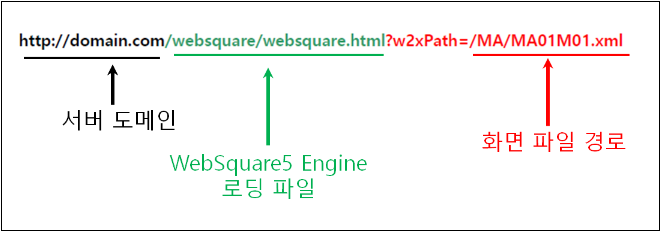
Upon the browser calling a web page written by WebSquare5, websquare.html file on the server side is first called. Then, the WebSquare5 Engine will run and the WebSquare5 code will be converted into HTML to be displayed on the browser. The following figure describes this process.
Figure 5-2.Page Rendering Sequence
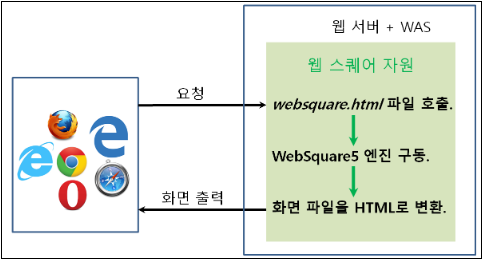
Figure 5-3.URL Representation
5.5Script
5.5.1scwin.onpageload
onpageload is an event automatically generated upon creation of a WebSquare Page file. The Script tab is to define onpageload onpageunload events. The onpageload event is loaded upon page loading.
Figure 5-4.Create WebSquare Page
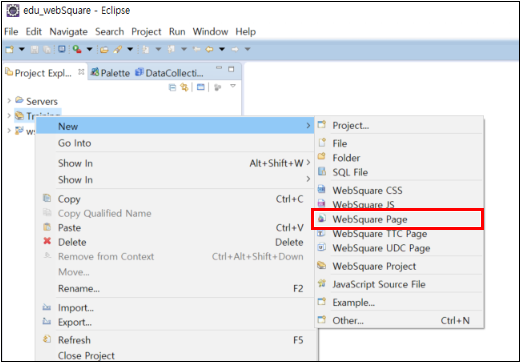
Figure 5-5.Upon Page Creation

Video Guide – scwin.onpageload execution sequence when there are multiple WFrames (WFrame)
Sample File
5.5.2<initScript>
Add initScript in the config.xml file as shown below. Executed before the scwin.onpageload script upon page loading.
Code 5-1.Config.xml Example (initScript)
<initScript value="true"/>
...

<wframe>
    <mode value="sync"/>
    <scope value="true"/>
    <initScript value="true">
        <![CDATA[
            alert("initScript");
        ]]>
    </initScript>
</wframe>
5.5.3<postScript>
Set the config.xml file to add <postScript> as shown below. The <postScript> is executed after the scwin.onpageload script upon page loading.
Code 5-2.Config.xml Example (postScript)
<initScript value="true"/>
<postScript value="true"/>
...
<wframe>
    <mode value="sync"/>
    <scope value="true"/>
    <initScript value="true">
        <![CDATA[
            alert("initScript");
        ]]>
    </initScript>
    <postScript value="true">
        <![CDATA[
            alert("postScript");
        ]]>
    </postScript>
</wframe>
5.6Script Execution Sequence
When the Scope function is enabled, the scripts are executed in the following order.
External JS Files
Local scripts
<initScript>
onpageload
<postScript>
In case the main page contains a WFrame, the script execution sequence is as shown below.
Order | Category | Execution order | Item |
|---|---|---|---|
1 | External JS Files | 1-1 | Main Page |
1-2 | WFrame | ||
2 | Local scripts | 2-1 | Main Page |
2-2 | WFrame | ||
3 | <initScript> (Defined in config.xml.) | 3-1 | Main Page |
3-2 | WFrame | ||
4 | onpageload | 4-1 | Main Page |
4-2 | WFrame | ||
5 | <postScript> (Defined in config.xml.) | 5-1 | WFrame |
5-2 | Main Page |
5.6.1When WFrames Are Overlapped
In case the main page contains overlapping WFrames, the scripts will be executed as shown below.
Figure 5-6.Script Execution Sequence (initScript, onpageload, postScript)
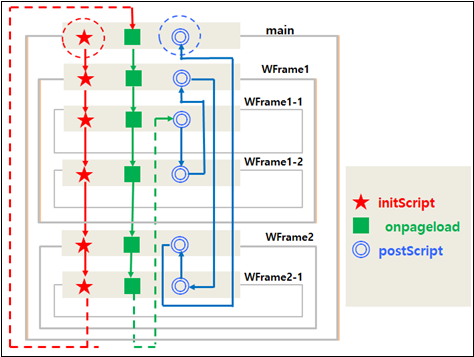
The execution sequence in the above figure can be numbered or listed as shown in the table below.
Page | initScript | onpageload | postScript | ||||
|---|---|---|---|---|---|---|---|
Main | 1 | 7 | 18 | ||||
WFrame1 | 2 | 8 | 15 | ||||
WFrame1-1 | 3 | 9 | 13 | ||||
WFrame1-2 | 4 | 10 | 14 | ||||
WFrame2 | 5 | 11 | 17 | ||||
WFrame2-1 | 6 | 12 | 16 | ||||
Video Guide – scwin.onpageload execution sequence when there are multiple WFrames (WFrame)
Sample File
Video Guide – scwin.onpageload, initScript, and postScript execution sequence for overlapping WFrames (Page)
Sample File
5.6.2When Scope Is Not In Used
When the scope is not in use, the scripts will be executed in the following order.
External JS file:
External JS files outside the PageInherit component file are loaded.
External JS files outside the main page are loaded.
External JS files outside the WFrame component are loaded.
Main page:
initScript of the main page (JS file defined in config.xml.)
Script written in the <script> space of the main page.
onpageload event in the main page (Defined in <script>.)
WFrame component:
initScript of WFrame component (JS file defined in config.xml.)
Script written in the <script> space of the WFrame component.
onpageload event of WFrame component (Defined in <script>.)
postScript:
postScript of WFrame component (JS file defined in config.xml.)
postScript of the main page (JS file defined in config.xml.)