1.Introduction
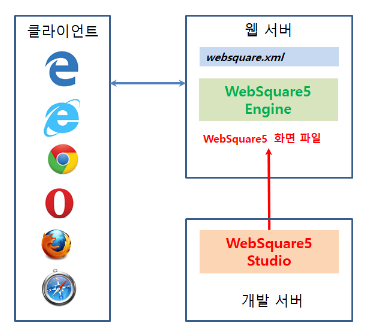
WebSquare5 consists of the Engine and the WebSquare5 Studio (development tool). The Engine receives requests from the browser and displays the WebSquare5 XML files on the browser in an HTML-compatible manner. The developer can create web UI on the WebSquare5 Studio.
1.1Studio
WebSquare5 Studio is a WYSIWYG-style integrated development tool. Developers can draw UI, add scripts, and test the web UI on the same environment. This document describes usage of WebSquare5 Studio IWD(Intelligent Web Designer).
1.1.1Specifications
OS | Type | Bit | Remarks |
|---|---|---|---|
Windows | Stand-alone | 32-bit | |
64-bit | |||
Eclipse Plug-in | 32-bit | ||
64-bit |
1.1.2PC Requirements
PC requirements for smooth installation and operation of WebSquare5 Studio are as shown below.
Item | Minimum | Recommended |
|---|---|---|
CPU | Pentium 4 | Pentium 4 (2.8Ghz) |
RAM | 2GB | 4GB |
OS | Windows XP/Vista/7/8/10 (32/64-bit) | Windows 7/8/10 (32/64-bit) |
HDD space | 1GB | 10GB |
Display | 1024 * 768 | 1280 * 1024 |
1.1.3Eclipse Support
Item | Description |
|---|---|
Eclipse Support |
|
JDK Support |
|
Others |
|
Eclipse 4.2 and previous versions do not provide official support for JDK 1.8.
(1) Only Window OS is to be supported.
(2) Minimum JRE(JDK) 1.8.0_2xx is required.
(3) openjdk-1.8.0.242-1.b08.x86_64 : Due to an internal bug, Eclipse projects are not created and WebSquare Studio does not normally function. Use other versions.
(4) Newly provided WebSquare Studio does not contain JRE any more.
(5) Java SE 8 and higher versions are not supported.
1.2Engine
The WebSquare5 Engine is provided as a JAR file and to be installed on the web server. The server specification on which the WebSquare5 Engine is to be installed depends on the specifications of the web server. It is recommended that the operator should configure the web server depending on the services to be provided through the web such as file upload/download.
1.3Specifications
Item | Range |
|---|---|
Installation Server |
|
Development Environment |
|
(App Running) Client |
|
1.4Browser Support
- Web
IE8 or higher (IE10 or higher to support HTML5 features.)
Other web browsers not including IE follows the evergreen policy (to support only the latest and the previous versions.)
- Mobile
Andorid
Safari (iPhone, iPad)
Automatically updates the browser without user’s initiation.
Guarantees successful execution on the latest and the previous versions.
Other web browsers than the IE adopt the evergreen policy.